Voice Tracking Done Right
Voice tracking used to be almost a dirty word. Early on it was a cost-cutting move — a way for stations to farm out their on-air work to talent in other markets. It expanded the market for that talent while sparing the station what it would’ve paid a local jock. Stations loved it. Talent, not so much.
But there was another side to it, even locally. Voice tracking let a jock use the time during the songs to get other things done without taking their attention off the air. When I was a PD and air talent, that was hugely valuable. Mornings were a different animal, of course — when I was a PD and morning guy, voice tracking wasn’t really an option. Music-intensive stations were always the best fit for the approach.
I spent several years doing mornings in Chicago for Bonneville, in my opinion the best of the big companies. When I moved out west to be a PD (and later Digital PD) for Clear Channel — later iHeart — WLIT in Chicago asked me to take over afternoons. I did, and it made sense for everyone. The PD knew me well, and I had experience and a profile in Chicago radio. I worked with two really good producers at WLIT, and the time difference wasn’t too bad, though it occasionally gave those producers a little anxiety. But it worked. I was still local — just physically displaced a bit. I had a blast doing it.
Technically, though, none of it was simple. The system we used required every studio installation to be “mapped.” My home studio was mapped to my station here in Phoenix, to Chicago, and later to Premium Choice — the system Clear Channel/iHeart built as an amalgamation of voice tracking and syndication. That was an amazing platform, put together by my longtime friend Darren Davis, a former producer at WASH-FM in Washington, D.C. and one of the smartest radio people I know (yea, the WLIT PD at the time is the other one). As long as a studio was on the network, or could VPN into it, it could be mapped into the whole CC/iHeart audio universe. That took real engineering and IT, but with a good engineer — and we had a great one in Phoenix — it wasn’t a huge problem. Still, a lot of it came down to people manually moving audio around.
As voice tracking matured and the focus shifted from pure cost-cutting toward quality of performance, it stayed complicated. It still leaned on client apps to make it happen. For the past couple of years I’ve done a little voice tracking for a streaming network running on an ancient PC platform originally built almost 15 years ago. As a dedicated Mac user, I was stuck running a Wine-wrapped port of a genuinely miserable Windows client. That experience stuck with me. When I started building SpinTrack, I made a promise to myself: no clunky client app, no downloads, no updates to chase, no OS lock-in.
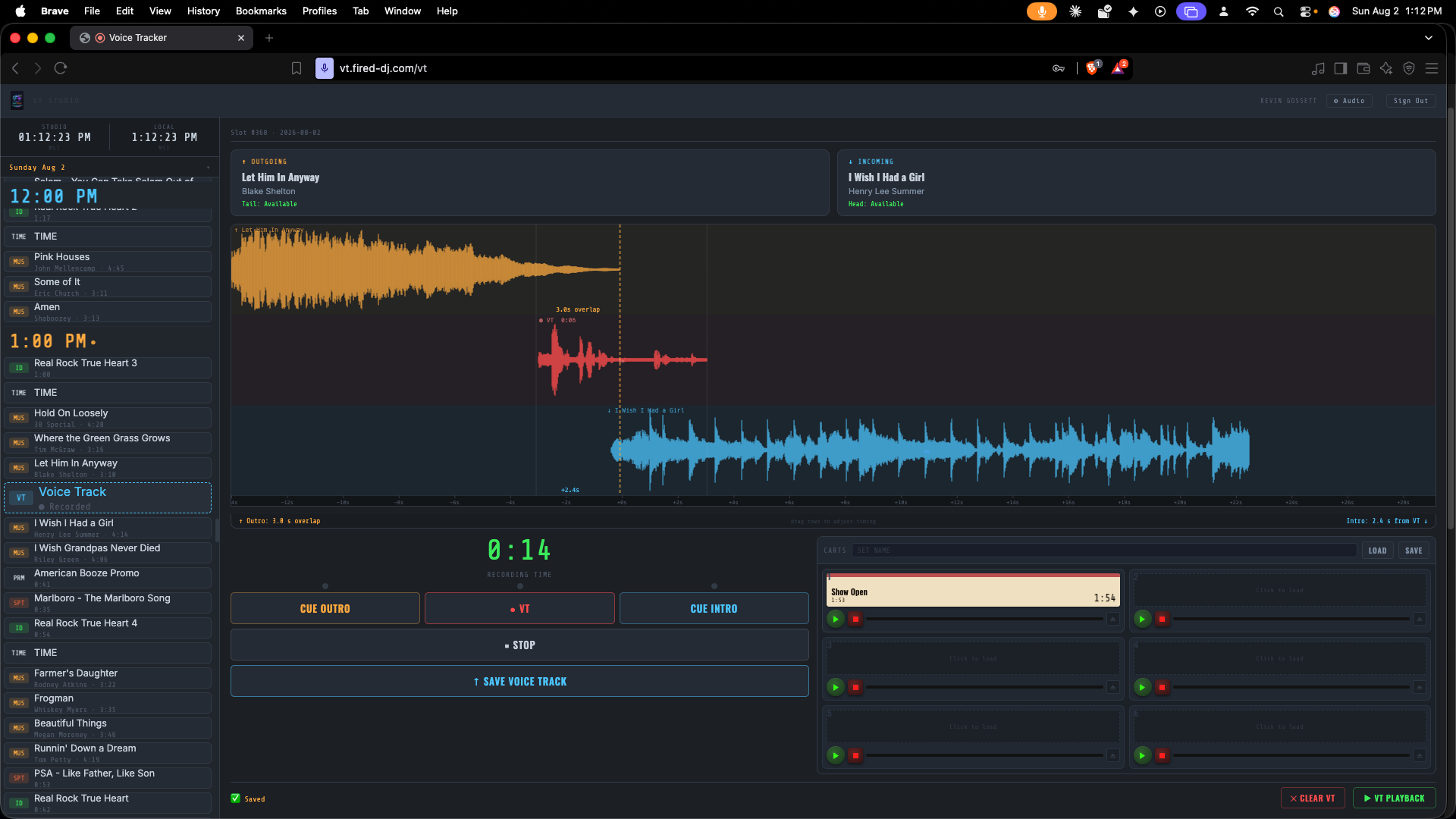
So that’s exactly how SpinTrack’s Remote Voice Track workflow works. All it takes is a URL in a browser. The jock goes to an address the station or stream defines, logs in with a username and password, and they’re ready to go. Because SpinTrack includes mic processing, the only gear a jock needs is a laptop or iPad and a microphone. There’s even a six-slot cart deck built in. Just as important, the workflow is identical to the local voice track system inside SpinTrack — learn one, you know both. The audio and data move through the cloud on infrastructure that’s rock-solid and low-cost for the station. It’s all very elegant.
We’re getting close to releasing the first beta, and I’m genuinely excited about the stations and streams that want to be our first users. If that’s you, reach out through the Contact form at spintrack.netlify.app.
Would love to hear from you.